
Decisions that survive the context window
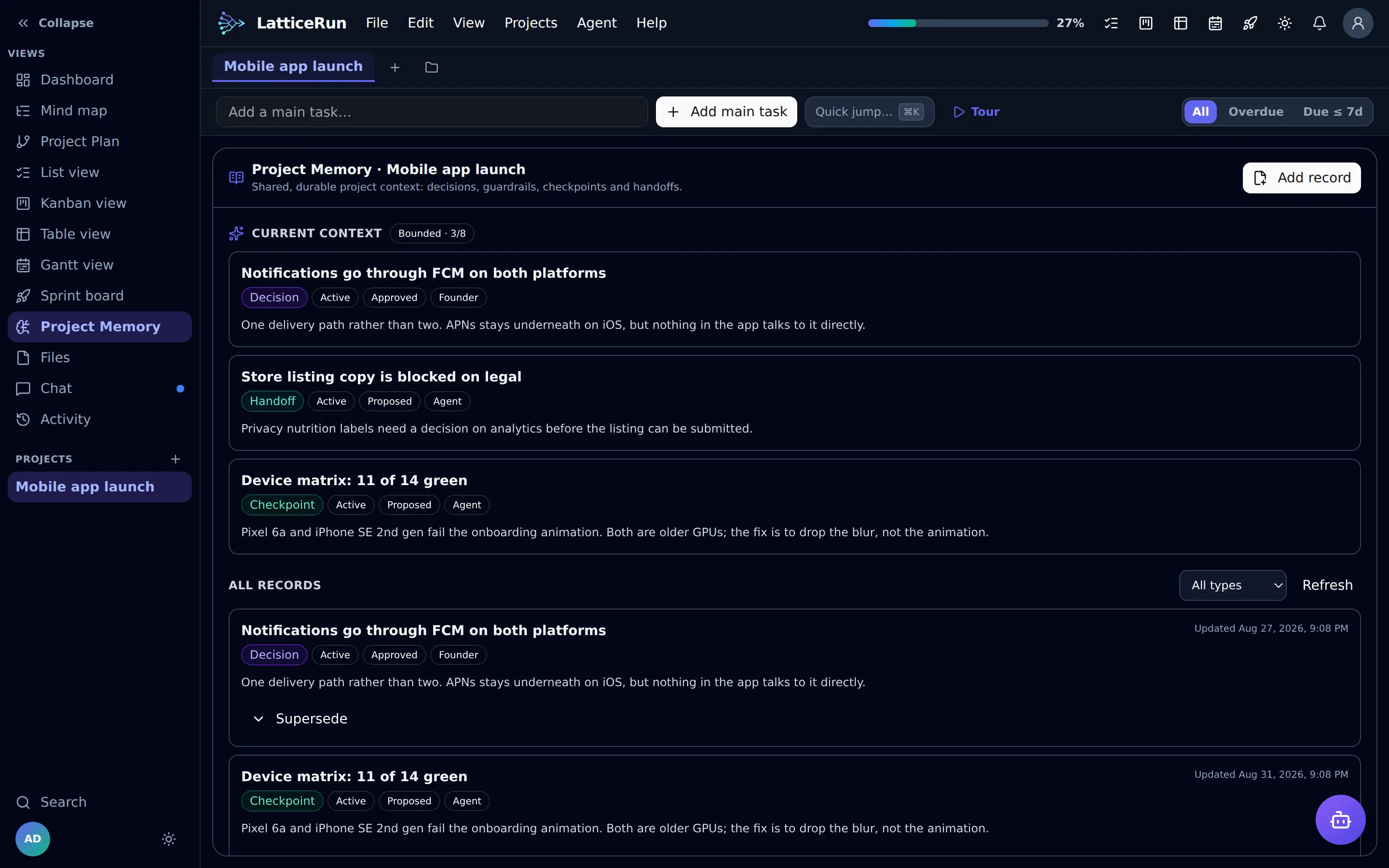
Decisions, guardrails, architecture, checkpoints and handoffs live with the project. Trust labels tell the next agent what is a suggestion and what is settled.
proposedapprovedverified
LatticeRun keeps the task tree, the plan and the decisions in one place — and hands every new agent session the brief, the memory and the branch it needs before it writes a line.
Mind map, List, Table, Workstreams, Gantt and Sprint — six views of one canonical tree.
mcp.latticerun.com/mcp — OAuth for Claude, a revocable token for everything else.
Guided corrects out-of-order agent work. Strict refuses task writes outside the claim.
Free account, no card. Agents and Project Memory from $12 a month.
Agents are fast and forgetful. Without a shared record, you spend the first ten minutes of every session re-typing the stack, the decisions and where you left off — and the agent still edits the wrong thing.
you   ▸ pick up the billing work
agent ▸ Happy to. What’s the stack, and where did we leave off?
you   ▸ Supabase and Stripe. Webhooks, not polling. Again.
agent ▸ Should seats be per project or per account?
you   ▸ We settled that last week. Per account.
agent ▸ Got it. Refactoring plans.ts now…
      ✕ rewrites work another session already shipped
      ✕ no record of what it changed, or why
→ latticerun_start_task("4.2 · Seat changes")
← claimed  branch 4.2 — intent shown live on the tree
← brief    agent.md: stack, conventions, deploy rules
← memory   decision · seats are per account  approved
          guardrail · never edit an applied migration  verified
← plan     phase “Billing” · 3 of 5 tasks done
  … works the branch …
→ latticerun_complete_task("Seat changes via portal")
✓ progress rolls up · checkpoint proposed for the next agent
Without: context lives in your head and a scroll-back nobody will read again.
With: context lives with the project, trust-labelled, and arrives with the claim.
The protocol is enforced by the connector, not left to a prompt. Your agent can’t quietly wander off the branch it claimed, and every run leaves an account of itself.
In Claude, add a custom connector and approve it — OAuth does the rest. Claude Code, Kimi, Hermes and other MCP clients use a revocable agent token.
https://mcp.latticerun.com/mcpClaiming hands it agent.md, bounded Project Memory, the plan synopsis and the active sprint. While it holds the claim, that branch is its to change — and nothing else is.
Work that needs sign-off arrives as an artefact you approve, reject or send back per section. Completion writes a checkpoint, and progress rolls up the tree.
Full setup for every client in the connector docs · the working method in the Agent Guide.
Decisions, guardrails, architecture, checkpoints and handoffs live with the project. Trust labels tell the next agent what is a suggestion and what is settled.
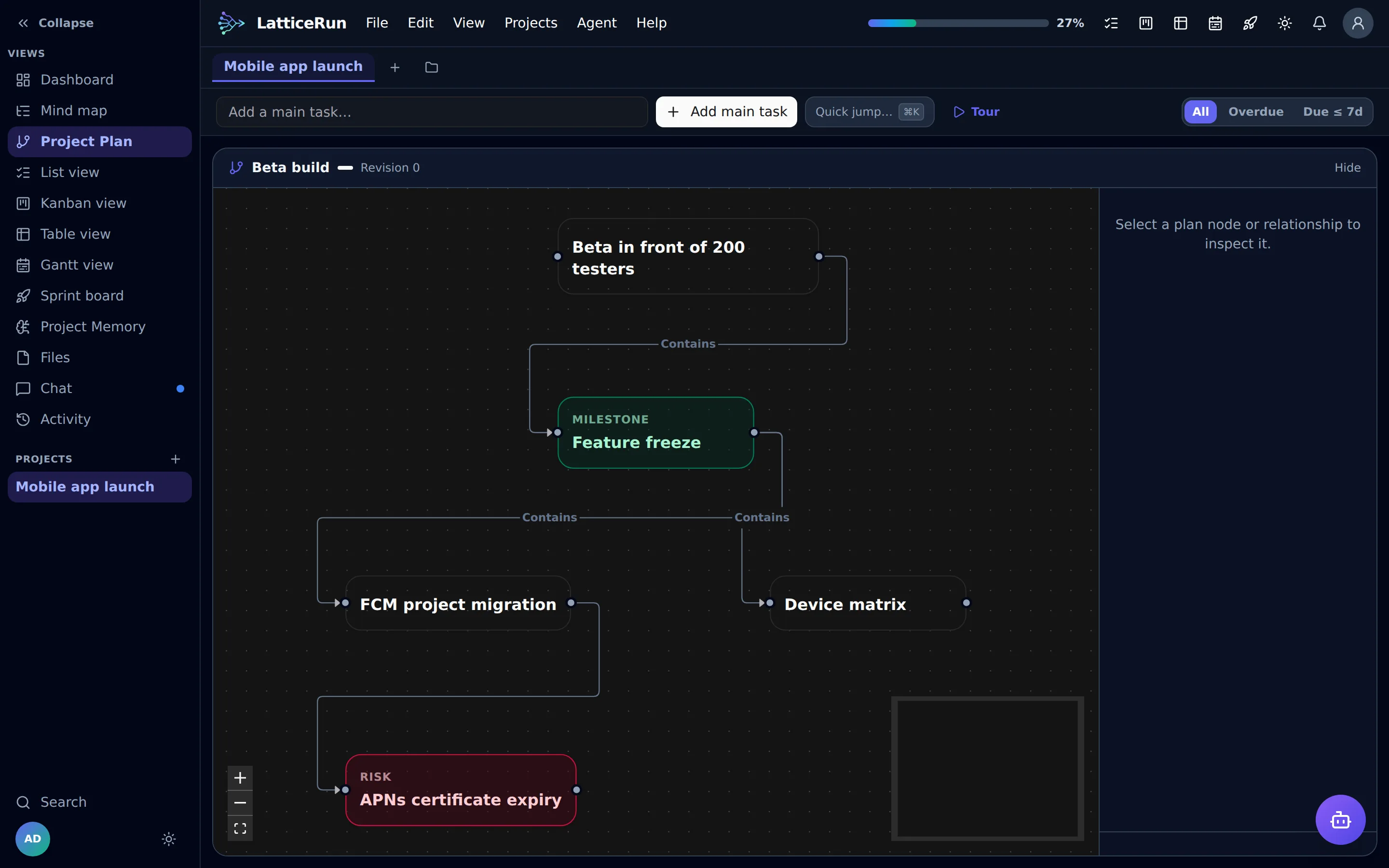
You, an agent in Plan Mode, or both draw the flowchart. Approve and release it, and its executable nodes become linked tasks whose progress rolls back up. Planning stays optional.
A pulsing pill on the tree shows the branch an agent holds and its own sentence about what it is doing. Anything it gives up on is flagged blocked, with the reason.
Guided corrects out-of-sequence calls. Strict refuses task writes outside the claimed branch and blocks new claims when the brief is overdue. Agents can read the setting; no tool can change it.
Drafts that need a human arrive as artefacts. Decide each section on its own and leave comments the agent reads before it redrafts.
Give an agent a notification address and LatticeRun emails it when you approve, decline, request a revision or comment — so a dispatcher can start it before its next claim. A missed email is late, never lost.
Wake an agent on a decisionEvery write is stamped with the person or agent token that made it, so “who changed this?” has an answer — agents included.
Read the connector docsOne canonical task tree, so switching views never forks the truth. Progress is derived from completed work, never typed in.
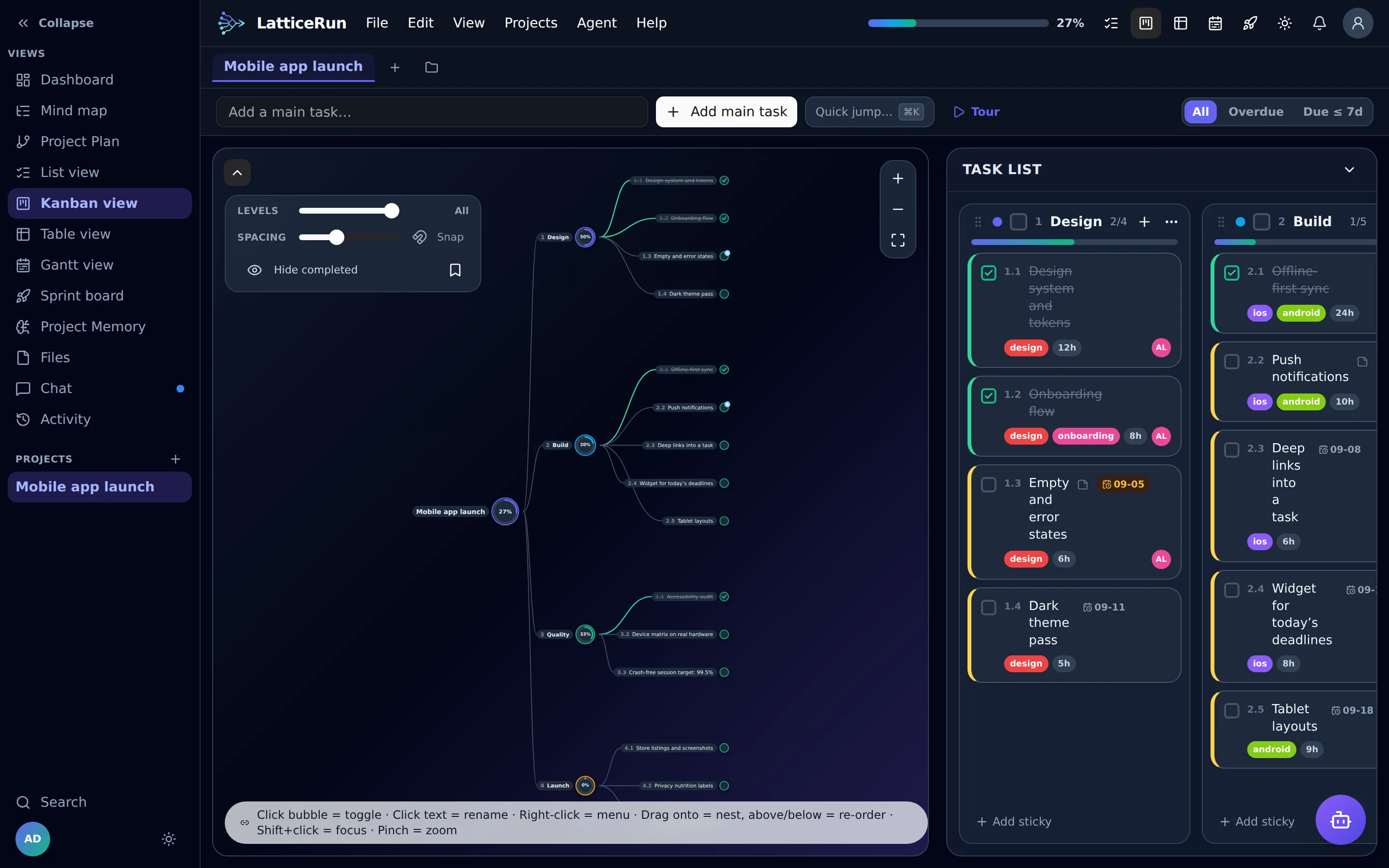
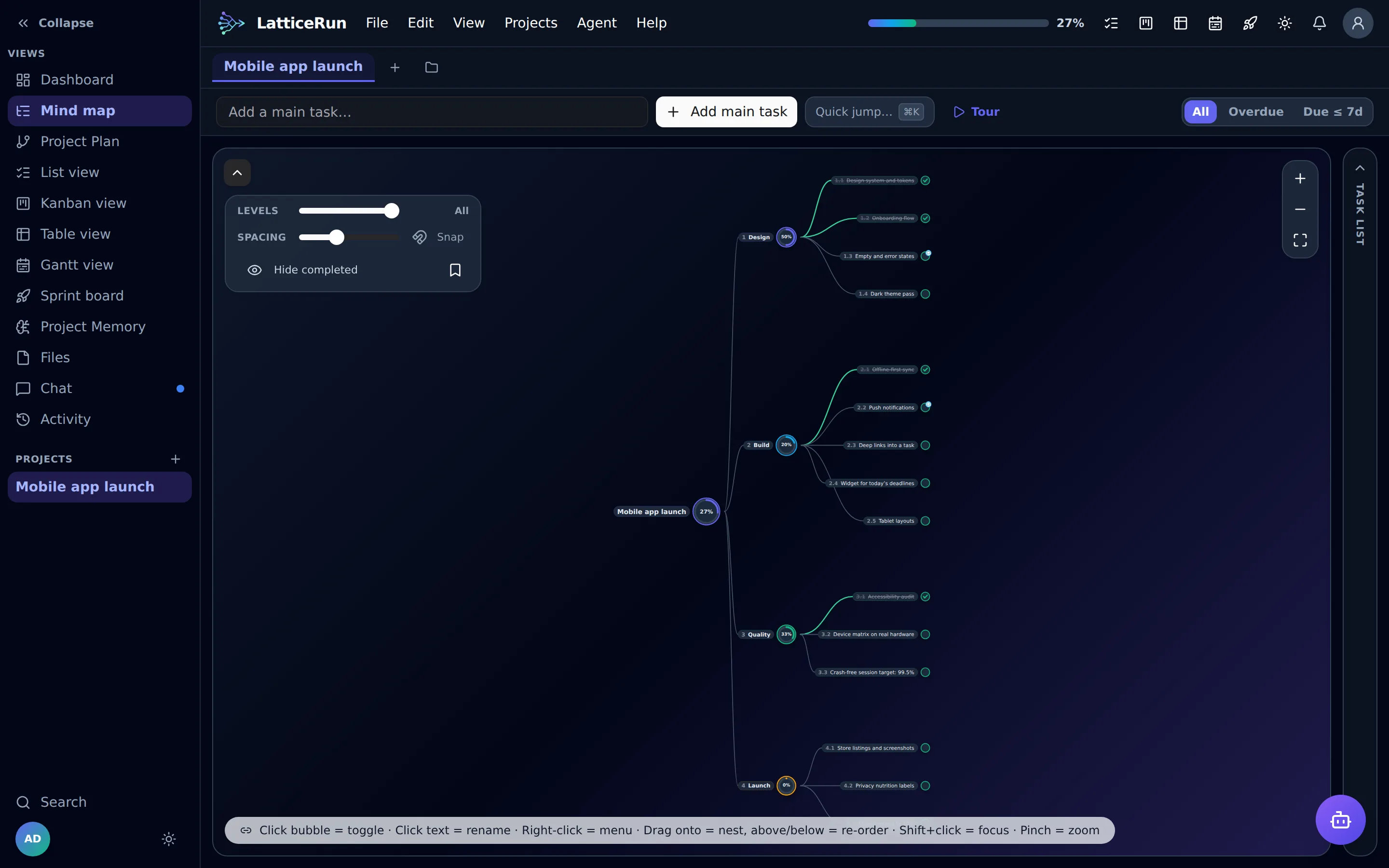
The living tree. Drag branches, zoom, focus on one limb, watch rings fill.
A fast nested checklist with inline editing, drag-to-reorder and deadline sorting.
Every branch in one grid, with estimates and totals, for audits.
Each parent a column, each child a card. Reorder streams and cards by drag.
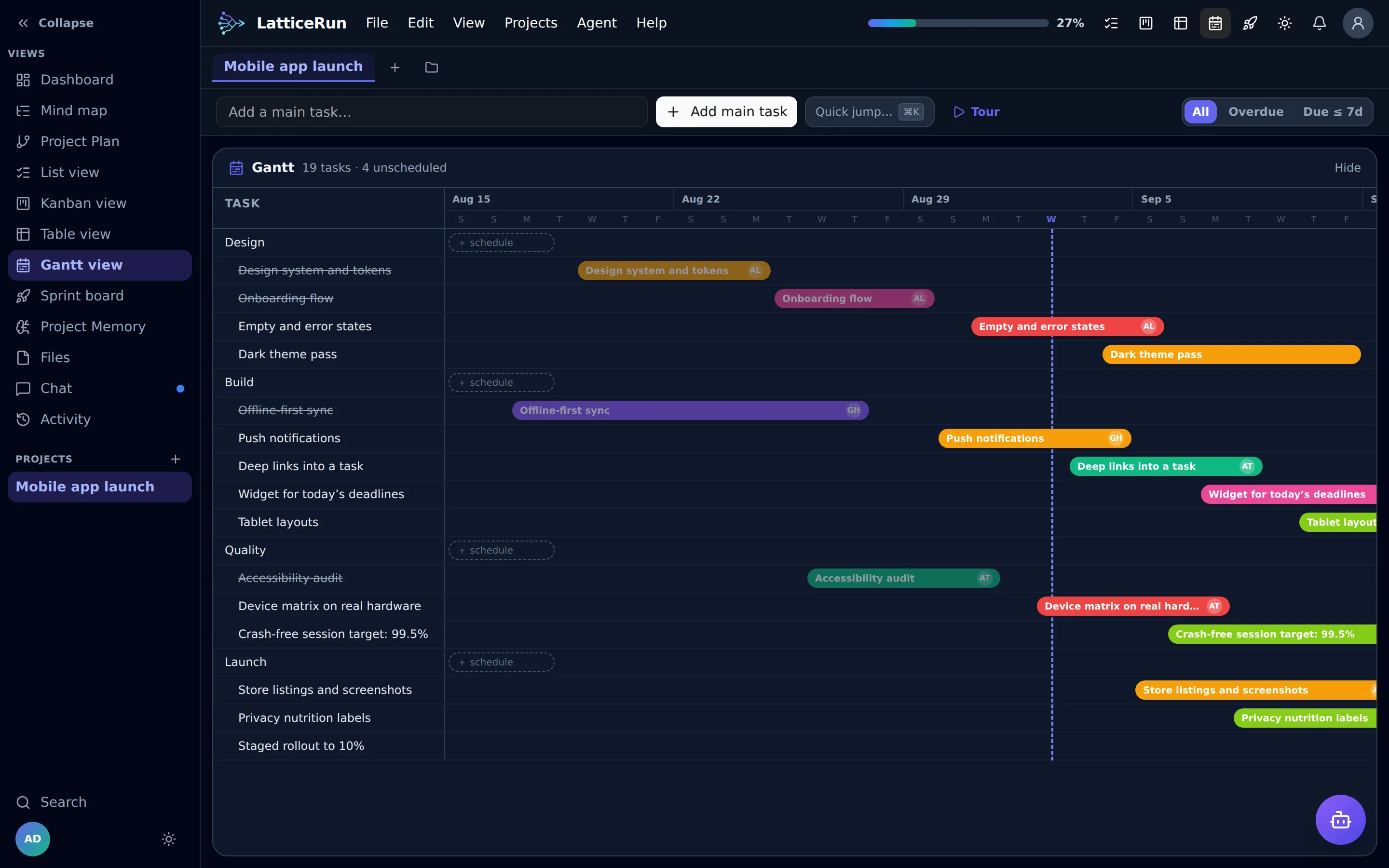
Every branch on a dated calendar with a live today-line.
A named, timeboxed slice pulled from any branch — the tasks stay where they live.
Progress, tags and upcoming dates across every project, at a glance.
Attachments on the task they belong to, and a conversation per project.
JSON backups and SVG export of the tree, on every plan.
Anything big enough to lose track of is really a tree. Break it down once, work from whichever view suits the hour, and see how far in you actually are.
Hand over a branch, not the whole plan. Spin a task into its own linked project and a collaborator sees just that limb, while progress flows back to the parent. Team workflows →
Your agent works the tree you already have. It claims before it touches, reports what it built, and leaves a record instead of a diff to reverse-engineer. How agents connect →
Free covers local projects and the core views. Paid plans add cloud sync, Sprints, the Project Plan, Project Memory and the MCP connector.
Try the tree on your next feature.
forever · free account, no card
Free projects live in this browser only — no copy on our servers. Export regularly, or upgrade for cloud backup.
Your agents, briefed and on the plan.
or $99/year — 2 months free
Cancel anytime. 30-day refund on your first paid purchase.
Everything in Solo Pro, paid once.
one-time · no subscription
Shared projects, an agent per seat.
up to 5 seats · $9.80 per seat
Yes — Pro and Team plans include a first-party MCP connector. Point Claude Code, Kimi, Hermes or any MCP-compatible agent at it and it can work your trees directly. Start with Keeping an agent on the plan; the tool-by-tool reference is in the connector docs.
Project Memory is shared, durable project context: decisions, guardrails, architecture, checkpoints and handoffs stored with the project for successors. Trust labels show whether a record is proposed, approved or verified.
By checking the claim workflow on task-changing calls. Claiming gives the agent its branch, the project brief, bounded Project Memory and a Project Plan synopsis; a successful completion checkout records what was built and saves a proposed checkpoint. Guided corrects out-of-sequence work without refusing it. Strict refuses writes outside the claimed branch and blocks new claims when the standing brief is overdue. Agents can read the setting, but no tool can lower it.
It files it as an artefact — a review thread, one per task. If it delivers five drafts for the same task in one run, they arrive as five sections of one thread rather than five separate items, and each section is decided on its own: approve, reject, or request a revision with a note. You can also leave comments, which the agent reads alongside the decision on its next pass. An approved thread is executed by the agent and marked executed; a rejected one is closed. Everything lives in the Artefacts tab, with a dot when a decision is waiting.
Yes, if you give the agent a notification address. In Agent tokens you define an address — AgentMail is the easiest inbox for an agent — and assign it to the agent; when you approve, decline, request a revision or comment on its artefacts, LatticeRun emails that address once per artefact, naming the agent and the artefact with your note and a link back. It is a doorbell, not the source of truth: the agent still receives every decision on its next claim, so a missed email is late, never lost. The guide covers receiving the mail and waking the agent.
A founder, an agent, or both can draw and edit a flowchart. Using an agent's Plan Mode is optional. When you approve and release the plan, its executable nodes create or link tasks, and progress rolls back up as those tasks move.
Often, no. Project Memory is the shared, durable record of decisions, guardrails, architecture, checkpoints and handoffs. agent.md remains the compact standing brief, task notes stay attached to work, and Activity records what happened. Agents receive a bounded, trust-labelled briefing when they claim work, so successors can continue without treating every proposal as fact.
Completely. On the Free plan your projects are written to this browser's local storage and never sent to us — we have no copy and no way to read them. You can export any project as JSON (a full backup) or the chart as SVG at any time. Cloud sync is opt-in and only on paid plans.
Yes, and it's worth being blunt about it. Free projects live in one browser's local storage, so they go away if you clear cookies and site data, use private windows, uninstall the browser, or let the browser evict storage when disk space runs low. They also don't follow you to another browser, device or profile. Because we never receive a copy, we cannot restore them for you. Export to JSON periodically, or move to a paid plan and let cloud sync keep a server-side copy.
Those are workspaces; LatticeRun is one thing done exceptionally: a task tree with live progress, seen through six views, built for the agents doing the work. No databases to design, no setup weekend. Open it, grow your tree, ship.
Any task can be spun off into its own standalone project that stays in two-way sync with the parent tree. On Team plans you can invite a collaborator to just that spin-off — they never see the rest of your tree.
Solo founders, indie hackers, freelancers and small teams who think in trees but ship from lists — and who increasingly hand that work to coding agents.
Open the free app, name a project, break the work into tasks. Connect an agent when you’re ready.